How to provide billing and service contact information?

How to provide billing and service contact information?

Now add different customer details for billing and service addresses. The contact information section is present in the various modules such as Jobs, Quotes & Invoices, and Customer. We are discussing the Job module’s contact information here, in the same way editing the contact information for the other modules is simple. 

1. Select the “Jobs” module from the left panel.
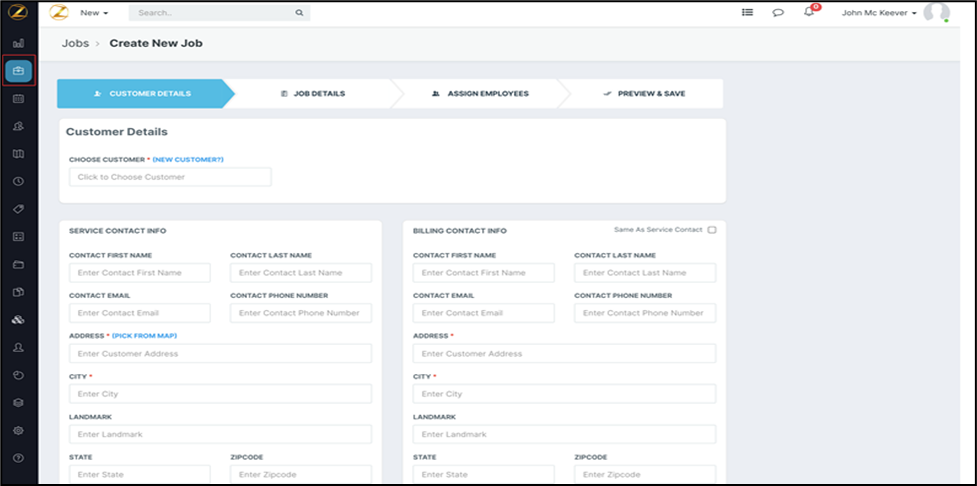
2. Select the “Edit Job Address” option under the Jobs detail page. Then, enter the “Service Contact Info” and “Billing Contact Info” details such as Contact First Name, Contact Last Name, Contact Email, Contact Phone Number, Address, City, Landmark, and State. Click the “Submit” button.


3. The service and billing contact information details of the customers related to the jobs are saved per the user requirement.

Users can easily create and modify the billing and shipping addresses which helps them serve the customer effectively. 


    • Related Articles

    • How to create a new customer/contact in the Zuper web app?

      The "Customers" module is a key component that allows users to manage and interact with their client base effectively. This module typically includes features like customer profiles, contact information, transaction history, and communication logs. ...
    • How to access service tasks offline in the Zuper mobile app?

      Service tasks are individual well-defined/predefined tasks inside a job that have their own start, end date, and employee assigned. To learn more about how to create and manage service tasks, click here. Previously, service tasks were only accessible ...
    • How to create & manage Service Tasks?

      Our Zuper’s new feature, Service Tasks, helps the field executives complete each service task mapped to the jobs. Service tasks are used to create process steps, or checklists, for the field technician to follow when completing a work order and can ...
    • How to create a Service Contract?

      The service contract is the service agreement between the business and the customer, lists down services that need to be performed, timeline, and other vital information. Zuper allows the user to experience the best service contract creation for you, ...
    • How to create a new service territory in the Zuper web app?

      Zuper’s Service Territory simplifies planning and managing service regions, especially when dealing with large geographic areas. By dividing and controlling regions, you can ensure that your teams are strategically allocated to handle jobs within ...