How do we remove users from Zuper Pro?
When an employee leaves the organization or is no longer required to access Zuper, the deletion of the employee's account is now possible from Zuper.
Please follow the below instructions to delete an Employee in Zuper. You need to deactivate the employee and delete them.
1. Log in to Zuper Account. Select the "Employees" module from the left panel and choose the user you want to delete.
2. Find the employee and click on the "Deactivate" icon in the "action" column.
3. A confirmation for the window will pop up. Select the "Deactivate" button.
4. Now select the "Delete" icon to delete the user.
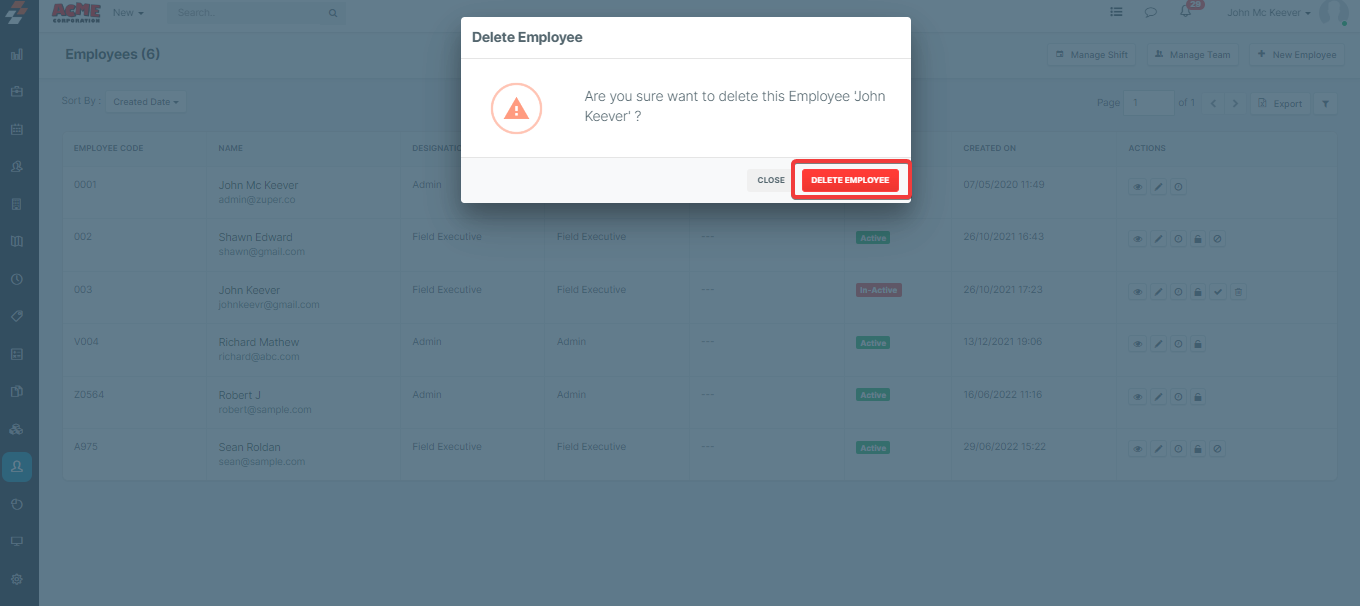
5. A pop-up will appear, and select the "
Delete Employee" button to remove the employee.
Related Articles
Detailed overview of users, scheduler, and map layouts in dispatch board
In addition to the dispatcher queue, the dispatch board includes several other interconnected layouts: Users, Scheduler and Map. These layouts work together seamlessly to provide a comprehensive view of operations and enhance the efficiency of task ...
How to access the Calendar/Schedule board in the Zuper web app?
Zuper's powerful calendar module provides a unified view of your entire schedule, including one-time and recurring jobs, non-job events, technician time-offs, and holidays. With its intuitive interface, you can easily navigate through different time ...
How to configure timelog in Zuper
Overview of Timelog The Timelog feature in Zuper transforms how organizations manage and track the time that field technicians spend on job-related activities. Initially, Zuper facilitated clock-in and clock-out automatically; however, the enhanced ...
Tracking Users’ Real Time Location
Users (field technicians) often travel to various locations throughout their workday, and it’s helpful for schedulers to know where users are at any given time. In Zuper, GPS-based user location tracking ensures that schedulers and team leads always ...
Tap to Pay on iPhone with Zuper
Zuper Pay now offers the Tap to Pay on iPhone option, providing field service businesses with a seamless, secure, and hardware-free payment solution. This feature enables technicians to accept contactless payments directly on their ...